5 · Watch and steer a task
What you'll do
Follow a job closely and step in when the AI heads the wrong way — redirect it, pause it, approve it, or call it off. You stay in charge the whole time.
The three panels, and which to trust
Open any running job and you're looking at three views of it:
| Panel | Shows | Use it to answer |
|---|---|---|
| Status | Where the job is, which AI, cost so far | "How's it going and what's it costing?" |
| Changes | The files the AI is editing, live | "What is it actually doing to my code?" |
| Chat | The AI explaining itself | "Why did it do that — can I redirect it?" |
When the AI's words and the changes disagree, trust the changes. The chat can sound confident and still be wrong; the changes are what will actually be kept.
Stepping in
While a job runs, you have a few controls:
| Action | When to use it | What happens |
|---|---|---|
| Send a message | The AI is on the wrong track | Your note goes straight into the AI's work — it adjusts course |
| Stop | It's going in circles or burning money | The job halts where it is |
| Approve / merge | The work is good and you want it kept | The change is merged into your project |
| Cancel / block | You've changed your mind about the job | It's set aside so no AI picks it up |
Sending a message is your main tool
Most of the time you don't want to stop the AI — you want to correct it. Sending a message drops a note right into its work, the same way you'd lean over and say "not that file — this one." For example:
"Stop — the problem is in the login page, not the home page. Undo the home page changes and look there."
The AI reads it and adapts. This is what makes TofuFactory different from a fire-and-forget tool: you're in the loop while it works, not just at the end.
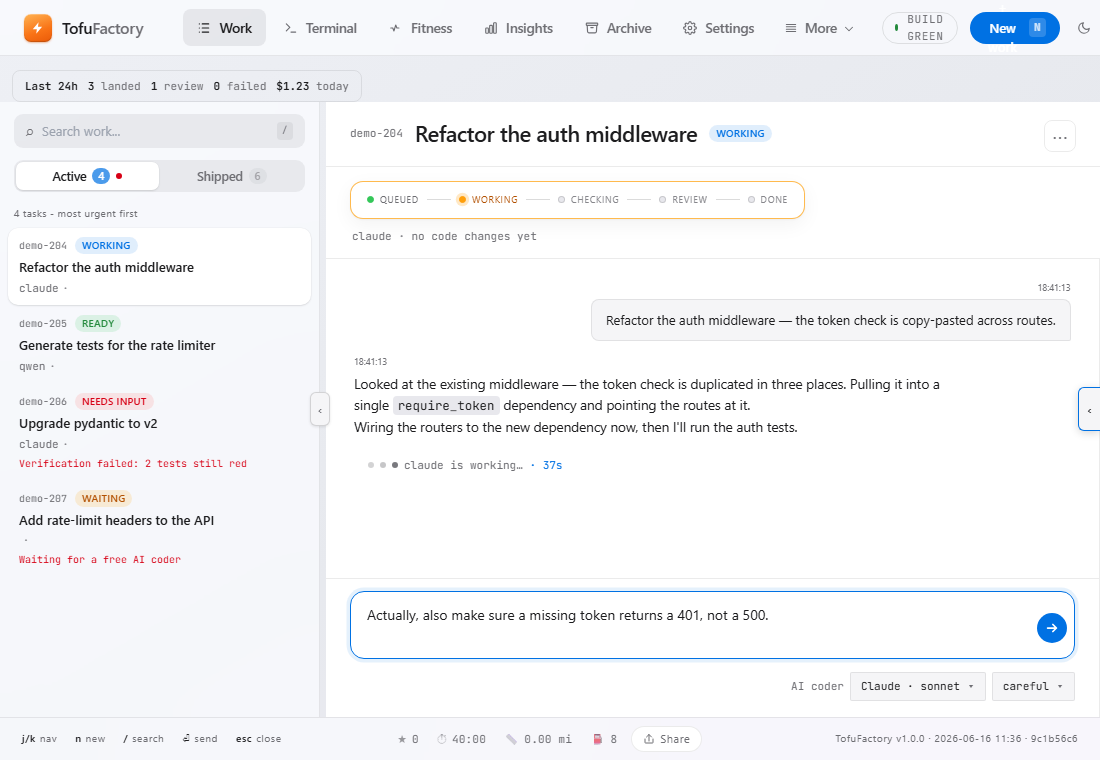
A real example
- You ask it to "fix the failing login test."
- Watching the changes, you notice it's editing the test to make it pass, instead of fixing the actual bug.
- You send a message: "Don't change the test — the test is right. Fix the login code it's checking."
- The AI undoes the test edit and goes after the real bug.
- The safety check passes on the genuine fix, and the job finishes on its own.
That's the whole skill: watch the changes, catch a wrong turn early, send a correction, let the check confirm the result.
A note on approving
If you ever approve work that didn't pass its check, you're choosing to trust your own eyes over the tests. Sometimes that's right — but if you find yourself doing it often, the check is telling you something. Don't make a habit of overriding it.
You should now see
- A clear sense of which panel to believe (the changes).
- Confidence that you can redirect a job without stopping it.
- The difference between nudging a job and calling it off.
If something's not right
| Problem | What to do |
|---|---|
| I sent a message but nothing changed | The AI applies it on its next step; if it was already finishing, it may be too late — stop it and start over with clearer instructions. |
| I stopped a job — is the work lost? | No. The work is kept on the side; you can pick it back up or merge it. |
| Approve didn't merge anything | There may be nothing to merge, or a conflict — open the changes to look. |
Next
→ 6 · Stay in control without watching — so you don't have to sit on this screen all day.