16 · Settings & personalization
What you'll do
Make the app yours — change its language and how it looks — and learn which buttons in Settings are the dangerous ones to leave alone.
Change the language
TofuFactory's screens can run in other languages. Go to Settings, find the language option, and pick yours. The app switches over right away.
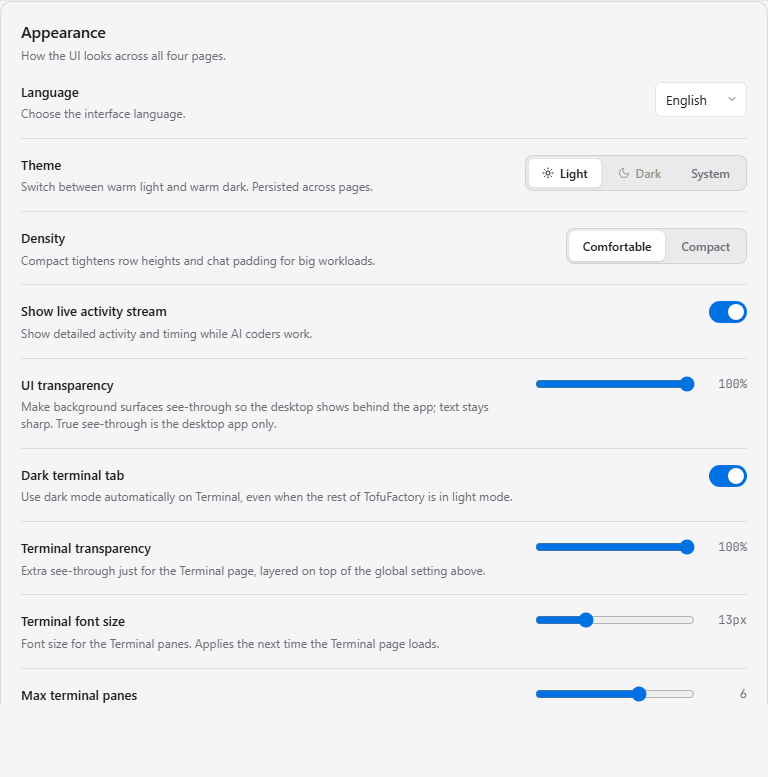
If a word here and there stays in English on an otherwise-translated screen, that bit just hasn't been translated yet — a small gap, not a broken setting.
Change the appearance
Settings also has appearance options — light or dark, and similar look-and-feel choices. Set it to whatever's easiest on your eyes.
The Danger zone
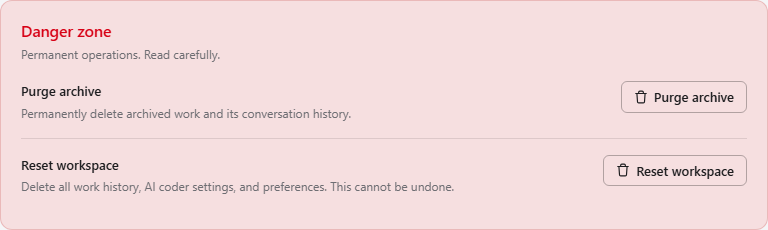
Settings has a Danger zone — a couple of powerful buttons like clearing out old archived jobs or resetting the workspace to a clean slate. These delete things on purpose and can't be undone from the app. Only use them when you really mean "make this gone," and read the button twice first.
You should now see
- The app in your preferred language and appearance.
- A clear sense of which buttons are safe and which are the Danger zone.
If something's not right
| Problem | What to do |
|---|---|
| The language didn't fully change | Some newer text may not be translated yet — that's a gap in the translation, not a setting that failed. |
| I clicked something in the Danger zone | Those actions can't be undone from the app. If you cleared archived jobs or reset the workspace, that data is gone — restore from a backup if you keep one. |
Next
→ 17 · Troubleshooting & recovery — the short checklist for when something seems off.