14 · Token telemetry
What you'll do
See where your AI spending actually goes — which jobs cost the most, whether caching is saving you money, and which model is eating tokens — on the Token Telemetry screen. This is the detail behind the spending limit you set on page 3.
Open token telemetry
Go to System → Token Telemetry. It's built to answer three questions:
- Which jobs are costing me the most?
- Is caching working, so I'm not paying full price every time?
- Which model is using the most tokens?
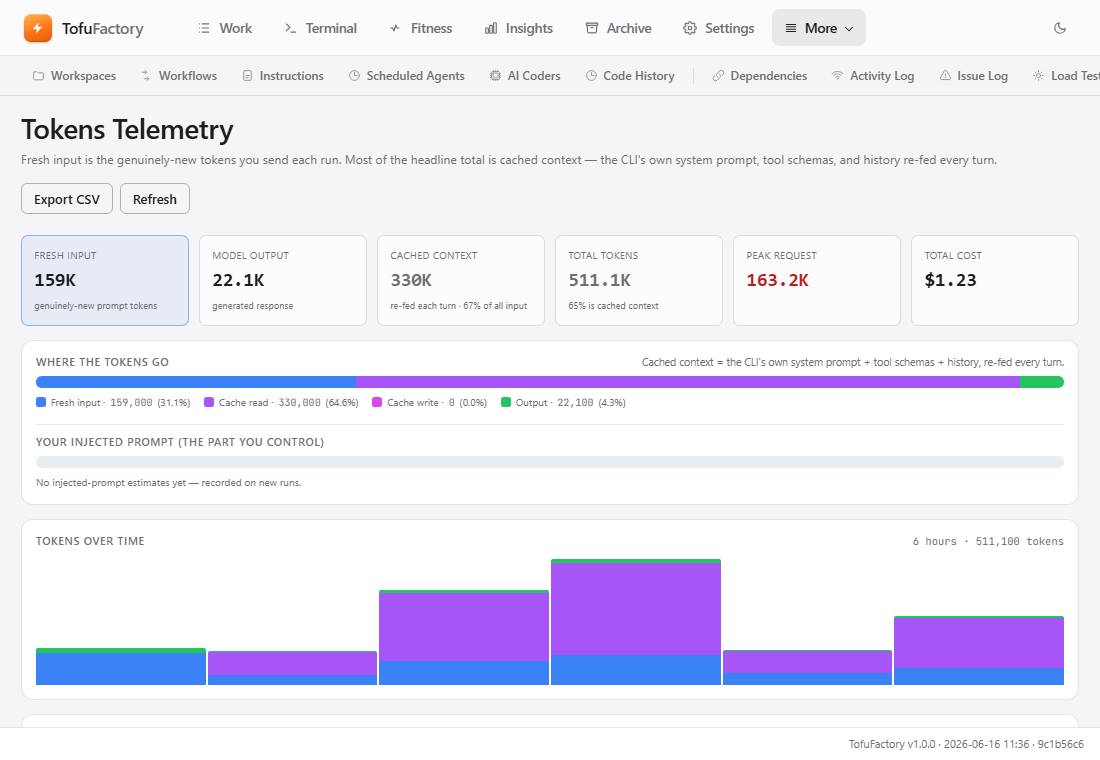
What the numbers mean
AI models charge per token — roughly, per chunk of text in and out. TofuFactory splits the count so you can see what you're paying for:
- Input — the prompts, instructions, and code sent to the model.
- Output — the code and text the model writes back. Usually the priciest per token.
- Cache read — repeated context (your files, the system prompts) the model remembered from last time. Billed at a steep discount — often up to 90% off — so more of this is good.
- Cache write — that same context the first time it's sent, before it can be reused cheaply.
Counted once. A job's tokens and dollar cost are recorded a single time, when it finishes — never per step — so the totals you see can't be inflated by double-counting.
Find the expensive jobs
The table at the bottom is where you dig in:
- Pick a time range — last hour, day, week, month, or all of it.
- Sort to surface what you're after: by total tokens (the heaviest runs), by cost (the priciest), or by cache reads (to confirm caching is kicking in).
- Filter by project or role to find which one drove a cost spike — was it Planning, or routine Utility work?
Catch a runaway before the daily cap
A single job stuck in a loop can burn a lot before it ever reaches your daily limit. The spike threshold is the tripwire: a run bigger than 100,000 tokens raises a warning. You can change that number — or have it pause jobs that cross it — in Settings → Budget (page 3).
You should now see
- Total tokens and cost over the time range you picked.
- A table of which jobs used the most output or cache-read tokens.
- A clear read on where your money is going.
If something's not right
| Problem | What to do |
|---|---|
| The numbers don't match my provider's bill | Some models report estimated costs. TofuFactory uses standard pricing to convert tokens to dollars, so small gaps are normal when a provider changes its rates. |
| Cache-read is always zero | Only some models cache (Claude Sonnet/Opus). If your role points at one that doesn't, you pay full price for input every turn — switch models if that cost matters. |
| A running job isn't in the table | Telemetry is written when a job finishes. For one in progress, open its task detail for a live estimate. |
Next
→ 15 · The Kitty Pool — warm standby agents that start work the instant you hand it over.